Skip to content
Sekolah PintarSekolah Pintar
  • Documetation
    • Getting Started
    • Attendance
    • Human Resource
    • Online Admission
    • Expense
    • Income
  • FAQ
  • Video Tutorial
  • Order Now
  • Demo
Documetation, Human Resource

How to add Leave Type?

To add leave type, go to Human Resource > Leave Type then enter Name and then click on Save button. You can view this added record in the Leave Type List on the right side of the page.
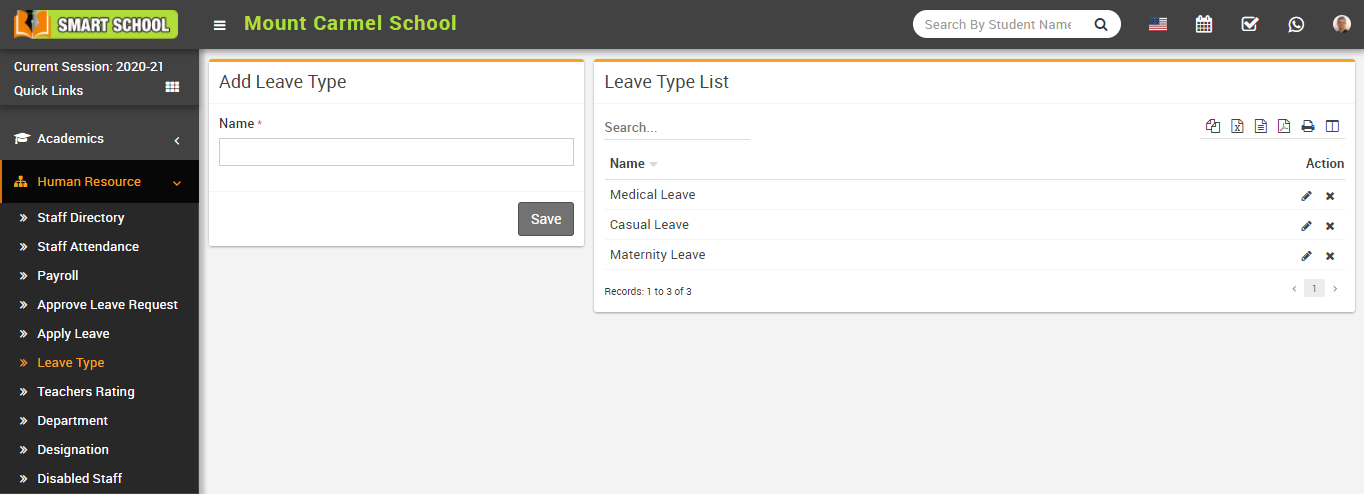
Add Leave type image

To edit leave type click on Edit icon and to delete leave type click on Delete icon present in the Leave Type List.

This entry was posted in Documetation, Human Resource. Bookmark the permalink.
How to add Designation?
How to add Staff Directory?
Documentation
  • Getting Started
  • Attendance
  • Human Resource
  • Online Admission
  • Expense
  • Income
Copyright 2026 © SEKOLAH PINTAR - Managed by WEBSIDE.ID
Powered by RVG NETWORK
  • Documetation
    • Getting Started
    • Attendance
    • Human Resource
    • Online Admission
    • Expense
    • Income
  • FAQ
  • Video Tutorial
  • Order Now
  • Demo