Skip to content
Sekolah PintarSekolah Pintar
  • Documetation
    • Getting Started
    • Attendance
    • Human Resource
    • Online Admission
    • Expense
    • Income
  • FAQ
  • Video Tutorial
  • Order Now
  • Demo
Documetation, Human Resource

How to check Payroll Report?

To check payroll report, go to Report > Human Resource then click on Payroll Report. Here select Role, Month, Year and then click on Search button. Here you can see payroll details like Role, Designation, Month-Year, Payslip #, Basic Salary($), Earning($), Deduction($) etc.
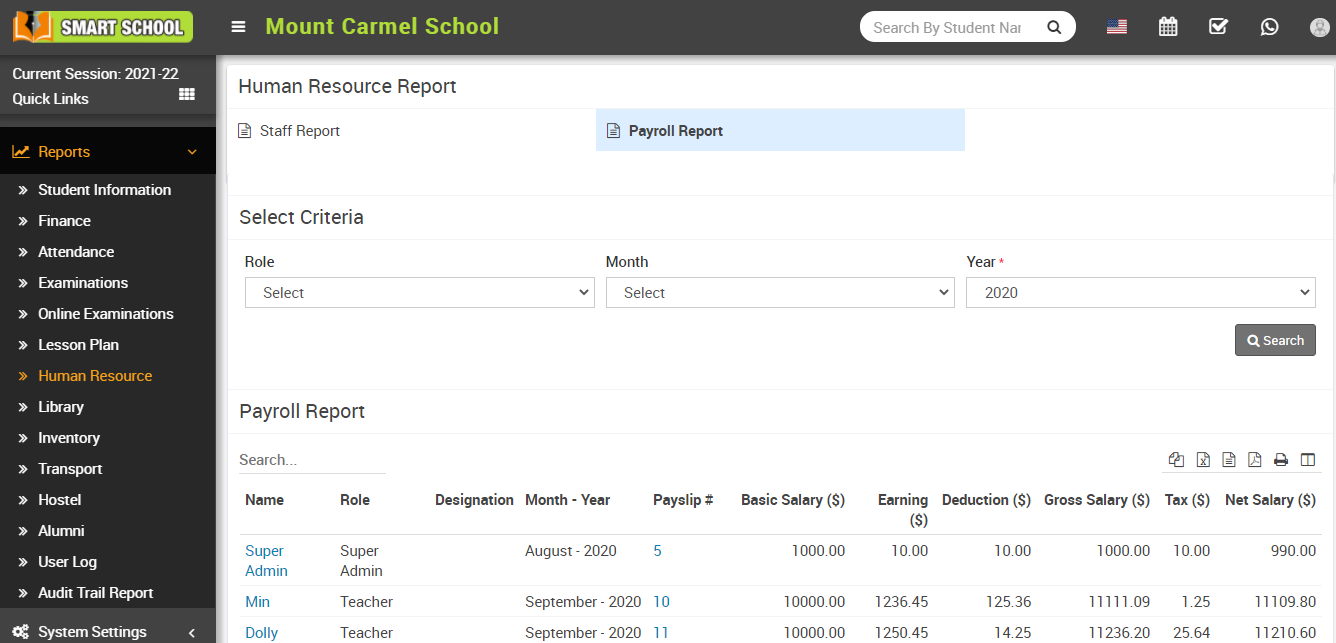
Payroll report image

This entry was posted in Documetation, Human Resource. Bookmark the permalink.
How to check Staff Attendance Report?
How student can check teacher review?
Documentation
  • Getting Started
  • Attendance
  • Human Resource
  • Online Admission
  • Expense
  • Income
Copyright 2026 © SEKOLAH PINTAR - Managed by WEBSIDE.ID
Powered by RVG NETWORK
  • Documetation
    • Getting Started
    • Attendance
    • Human Resource
    • Online Admission
    • Expense
    • Income
  • FAQ
  • Video Tutorial
  • Order Now
  • Demo